
This release introduces significant enhancements across planning, collaboration, user experience, security, and platform administration. Based on our discussions with customers and their user experiences and concerns, the focus has been put on improving how organisations plan, coordinate, and manage activity while reducing administrative workload and enhancing consistency and security across the platform. The overall impact of the release will ensure improved day-to-day operations for Exonaut users, administrators, and other stakeholders.
| Focus Area | Key Improvement |
|---|---|
| Integrated Planning | Calendars, Kanban boards, reusable templates, and organisation workspaces |
| Context and Traceability | Live document sharing, comments and linked resources |
| Enhanced User Experience | Clean, modern UI with easier access to info and fewer clicks |
| Platform Security and Quality | Continuous security monitoring, safer upgrades, and automated testing |
Integrated planning from strategy to detail
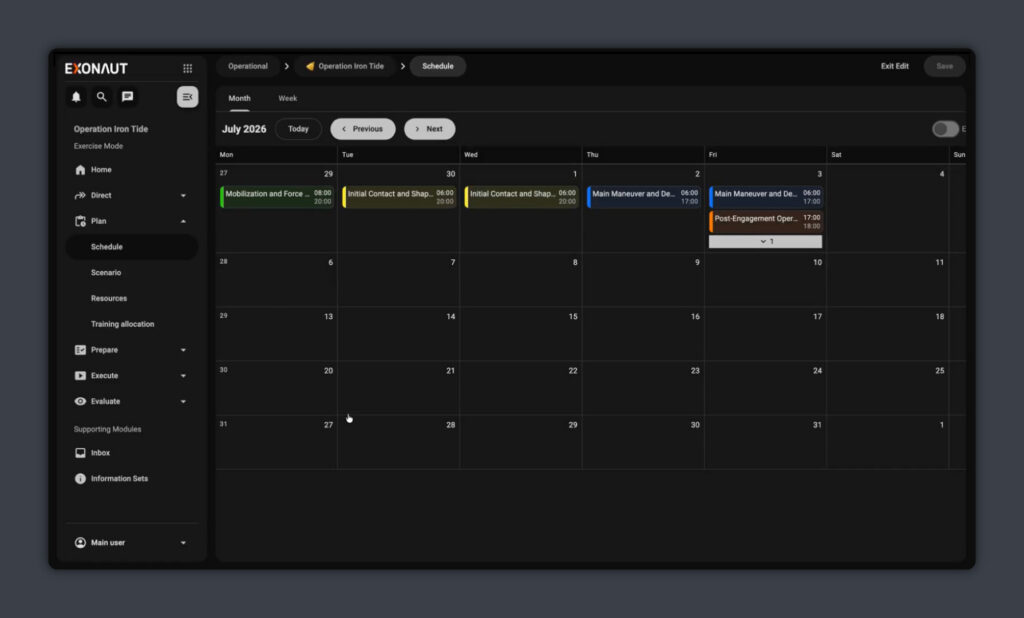
Plan Schedule Calendar
Collective Training and Exercise Management
A dedicated scheduling calendar has been added as a new Schedule sub-module under PLAN, featuring month, week, and list views. Events can be created directly from the calendar, with the selected date automatically populated in the event creation form.
For planners, the whole programme, campaign, or exercise is visible at a glance. Moving from long-range planning to individual activities no longer requires changing tools, making dependencies, overlaps, resource demands, and scheduling conflicts easier to identify and manage before they affect delivery. This save time and gives planners a clearer understanding of how changes in one activity affect the wider programme.
Activity Templates
Collective Training and Exercise Management / Programming & Scheduling
Complete planning structures can now be saved as templates and reused as the baseline for new activities. Only the planning structure is copied; execution data is not.
For planning teams, recurring exercises and activities can be established in minutes rather than rebuilt from scratch, while maintaining consistency across planning cycles, as templates and instance remain separated. This reduces planning effort, promotes consistency across planning cycles, and allows proven planning structures to evolve without affecting activities already in progress.
Organisation Workspace
Programming & Scheduling
Each organisational entity now has its own workspace, bringing together activity plans, tasks, objectives, personnel, and supporting information in a single location. Activities appear directly within the organisation structure, with enhanced task management capabilities including filtering, printing, and multi-select actions.
Planning is now anchored on the organisation itself rather than a separate hierarchy running in parallel, making related activities and information easier to access from a common workspace. This gives commanders and planning teams a clearer operational picture while reducing the effort required to coordinate activity across the organisation.
Task List & Kanban Board
Collective Training and Exercise Management / Programming & Scheduling
A Kanban-style board has been introduced alongside the existing task list, with changes or new tasks reflected in real-time for all users. Several long-standing usability issues within task management (duplicate dropdown entries, status not persisting, stale tabs) have also been addressed.
Teams can now manage work through a visual Kanban board without giving up the structured task list they already rely on. Shared, real-time visibility helps teams identify stalled work sooner, coordinate priorities more effectively, and maintain a common understanding of progress without relying on manual status updates.
Recently Opened Workspaces
Programming & Scheduling
Recently accessed workspaces, exercises, and programmes/campaigns are now available through a dedicated list, with the item type clearly displayed. Frequently used workspaces, exercises, and programmes can be reopened with a single click. This reduces unnecessary navigation and helps users quickly resume work where they left off, particularly when switching between multiple activities throughout the day.
Time Periods & Default Date Range
Programming & Scheduling
Administrators can now create edit, delete, and set custom time periods, including weeks, months, quarters, and organisation-specific planning windows.
Planning periods can now be managed consistently across the organisation, with the same date ranges applied across filters, exports, and print functions. This helps ensure everyone is working from the same planning window, improving confidence in reporting and reducing time spent reconciling different versions of the same information.
MIL2525 Symbology & Symbol Builder
Collective Training and Exercise Management
A new military symbol builder has been introduced for entities and resources, enabling users to browse, configure, and apply symbols from the full MIL-STD-2525 catalogue through a streamlined interface. This improves interoperability, reduces the expertise required to produce compliant symbology, and helps ensure information is presented consistently.
Learn more about ExonautImproved Context and Traceability
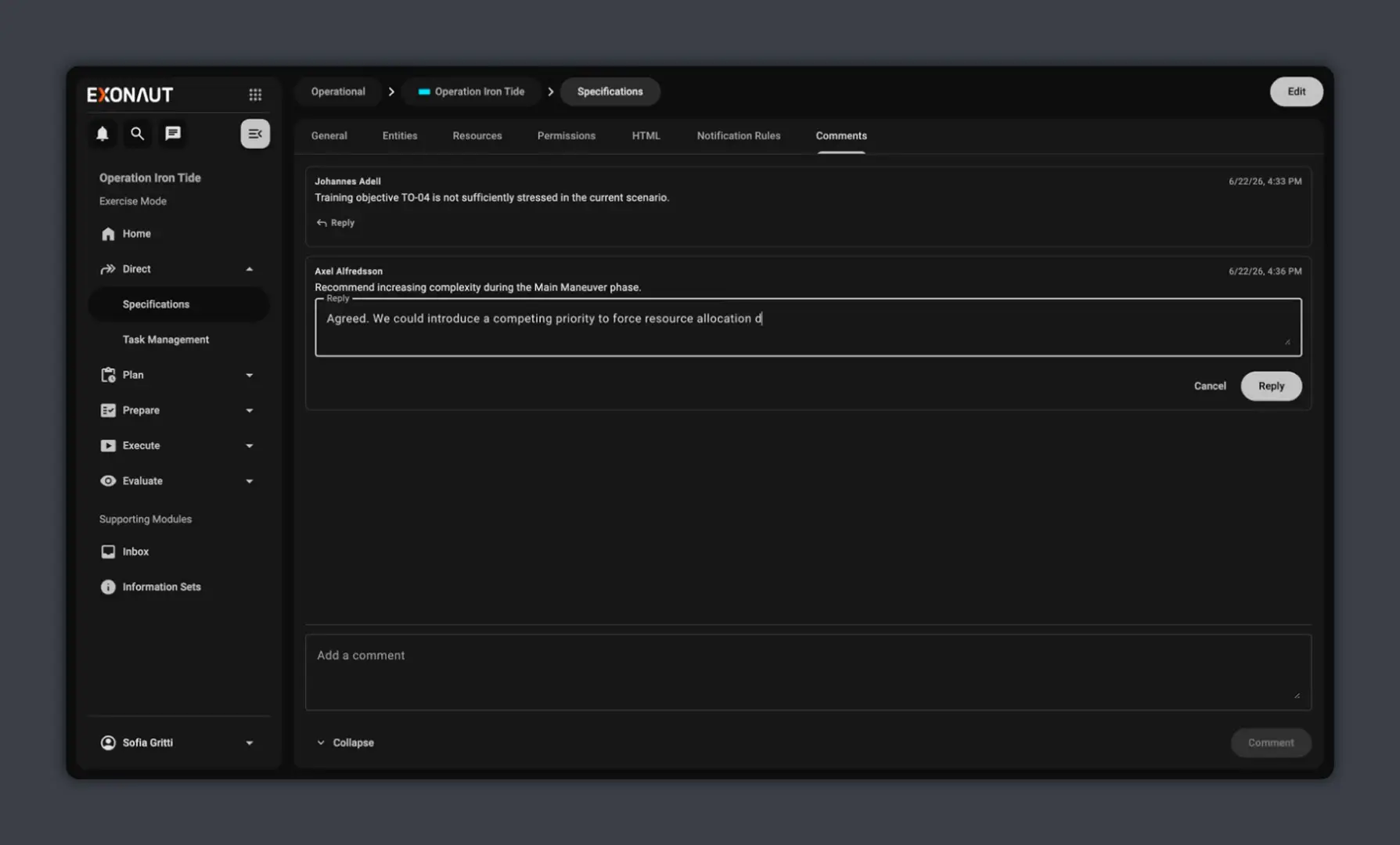
Comments Component
Collective Training and Exercise Management
Threaded comments have been introduced in planning objects, including exercises and activities, with support for replies, editing, and discussion history.
Discussions, decisions, and supporting context remain attached to the activity they relate to, rather than being scattered across email and chat tools. Teams spend less time searching for information or retracing previous decisions, while preserving decision history, improving handovers between teams, and ensuring valuable knowledge is retained long after an activity has finished.
URL Attributes
Collective Training and Exercise Management
Planning objects can now reference live external documents, such as SharePoint files, rather than requiring copies to be uploaded into the platform.
Supporting documents remain in their existing document management systems while always being accessible from the activity they support. This reduces document duplication, ensures users are working with the right data and shared, single version of the truth.
Contact an expert about ExonautEnhanced user experience
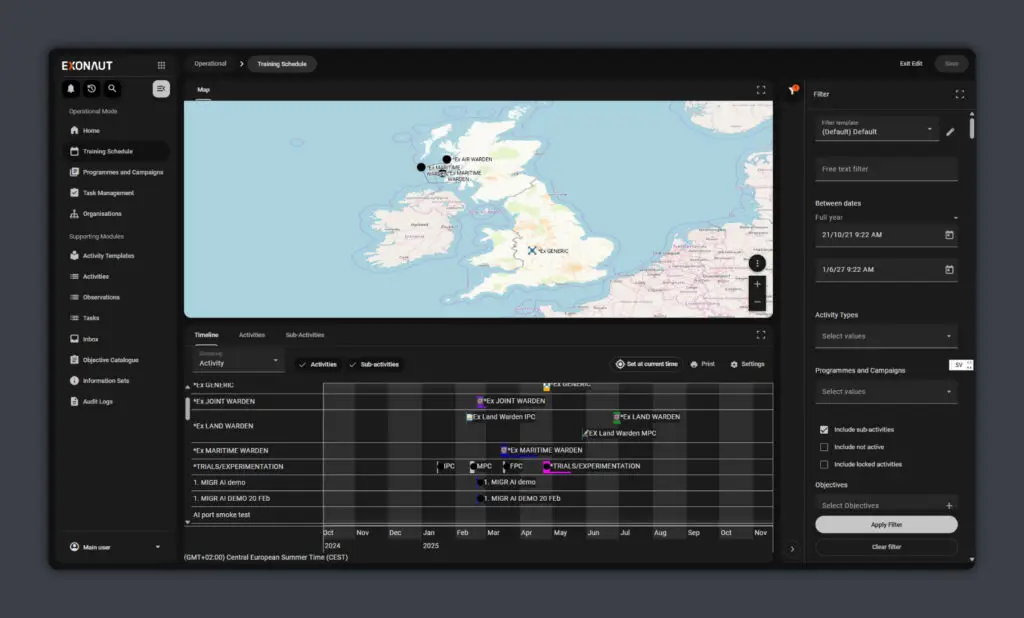
Material 3 Design
Collective Training and Exercise Management / Programming & Scheduling
The platform has been refreshed using the Material 3 design system, introducing updated layouts, typography, navigation patterns, and interface components across the products.
The updated design improves consistency across the platform, with clearer navigation, improved readability, fewer clicks, and fewer interruptions when completing common tasks. Design improvements in day-to-day workflows include:
- fewer clicks to reach common actions,
- fewer modal pop-ups interrupting the workflow,
- more consistent navigation patterns across products,
- better use of screen space,
- clearer hierarchy of information and actions.
The practical effect is faster onboarding, lower training overhead, quicker task execution, and a system that feels current alongside the other enterprise tools they use daily.
Common Utility Panel
Collective Training and Exercise Management / Programming & Scheduling
Tools previously distributed across multiple menus and workspaces have been consolidated into a common utility panel. For users working across multiple workspaces, commonly used tools are now available in a consistent location, reducing the effort required to find functionality and navigate the platform. This makes it easier and faster to onboard new users.
Learn more about Exonaut Collective Training & Exercise ManagementPlatform Security and Quality
Continuous Security Monitoring
Collective Training and Exercise Management / Programming & Scheduling
The platform is monitored continuously for known vulnerabilities, and third-party libraries are maintained on supported and patched versions as part of the normal release cycle.
For administrators and security teams, confirming that deployed software is current becomes easier. Security updates are incorporated as part of the standard release process, reducing manual verification and supporting software assurance, accreditation, and security compliance activities.
Accessibility Improvements
Collective Training and Exercise Management / Programming & Scheduling
An initial set of accessibility enhancements has been introduced across the platform, with further improvements planned in future releases. These changes improve usability and support compliance with accessibility requirements across defence and public-sector environments.
Safer Database Upgrades
Collective Training and Exercise Management / Programming & Scheduling
Database upgrade processes have been enhanced with improved visibility, control, and operational feedback. For administrators responsible for maintaining the platform, upgrades provide clearer information about what has changed, reducing uncertainty and making maintenance and upgrade activities easier to plan and faster to execute.
Improved Quality Assurance
Collective Training and Exercise Management / Programming & Scheduling
Automated end-to-end testing coverage has been expanded, alongside broader quality assurance improvements across the platform. Expanded automated testing provides a stronger safety net for future development, reducing regressions and helping avoid unexpected issues during exercises and operational use.
Modernised Platform Foundation
Collective Training and Exercise Management / Programming & Scheduling
This release includes upgrades to key platform technologies including Tomcat 11, Java 25, Angular 19, and TypeScript ES2023. Keeping the underlying technology stack current supports long-term maintainability, ongoing security, and future platform evolution while ensuring Exonaut continues to be built on supported technologies.